A WhatsApp CRM that runs on the channel your customers already answer.
Your enquiries, orders, and payment chases already happen on WhatsApp — just not anywhere you can see, measure, or hand to a new hire. We put a real CRM behind that number: one shared inbox for the whole team, no-code automation for the repetitive work, and a record of every conversation that outlives the person who had it.
WhatsApp is already your CRM. It just has no memory.
The consumer WhatsApp Business app was built for a one-person shop — one device, one user, 256 contacts per broadcast, and nothing that survives a staff exit.
Deals live on personal phones
Follow-ups sit in one salesperson's chat list. When they're on leave — or they resign — the pipeline and the relationship leave with the handset.
Leads go cold in the queue
An enquiry from your site, an ad, or IndiaMART waits hours for a human to notice it. The buyer has already messaged three competitors.
The same replies, typed forever
Price lists, stock checks, order status, GST invoices, payment reminders — the same handful of answers retyped hundreds of times a week.
Watch a lead travel from ad click to paid invoice
One real journey — no slide deck.
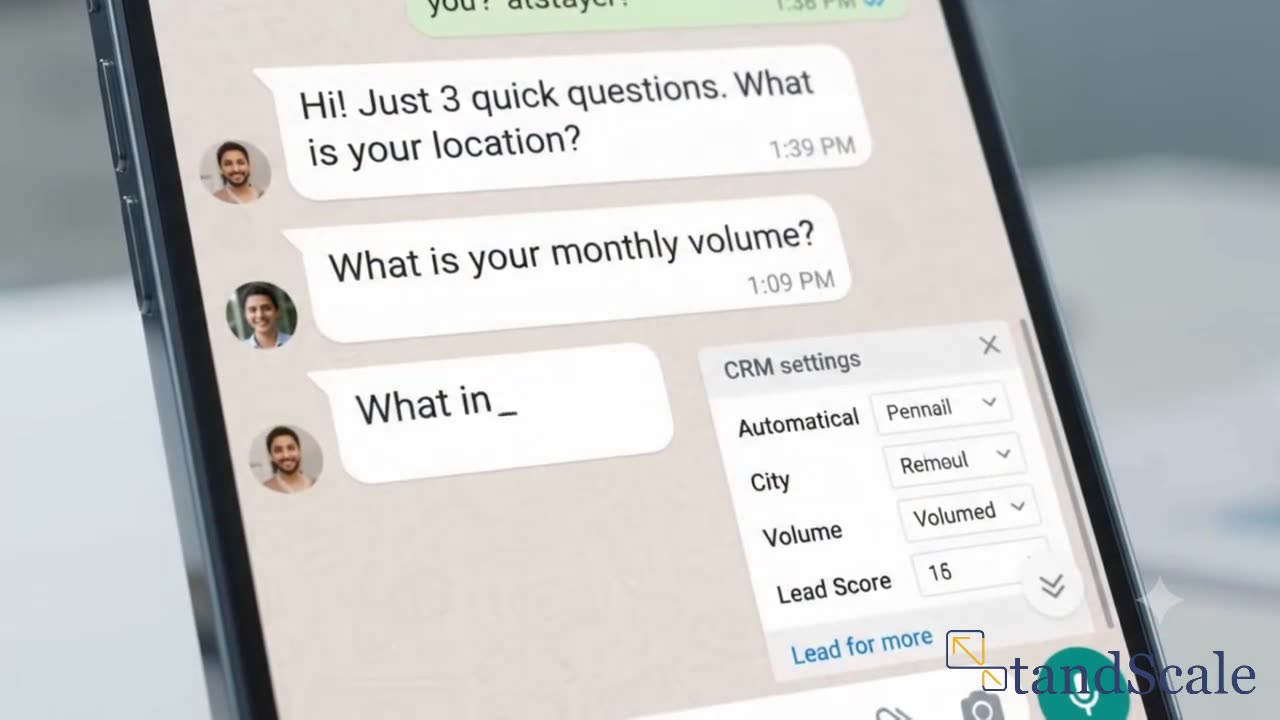 Demo · 10 sec
Want it walked through live instead? We'll map one of your real processes on the audit call.
- Lead lands. A Click-to-WhatsApp ad, a website widget, a QR code on your invoice, or an IndiaMART enquiry drops the customer straight into a chat — already identified.
- The bot qualifies. A no-code flow asks the three questions your sales team always asks, captures the answers as CRM fields, and routes only real enquiries to a human.
- A human takes over. The conversation appears in a shared inbox with full history, tagged and assigned, so whoever picks it up already knows the context.
- The order moves itself. Confirmation, stock check, payment link, GST invoice PDF, and dispatch update all fire as utility messages off your existing billing system.
- Nothing goes quiet. Unanswered quotes, overdue payments, and 30–60 day reorder cycles trigger their own follow-ups — without anyone remembering to send them.
The fastest way to reach us
See it running on the channel itself
It would be odd to read about WhatsApp automation and then fill in a web form. Scan the code or tap the button, send us one real enquiry you handle every week, and we will show you exactly what the automation would do with it.
The full WhatsApp Business Platform, configured around your process
Built on the official Cloud API through an authorised provider — not an unofficial tool that risks your number.
Shared team inbox
Unlimited agents on one business number, with assignment rules, internal notes, and every past conversation attached to the contact.
No-code chatbot flows
Lead qualification, FAQ handling, appointment booking, and order status — built and edited by your team, not by developers.
Broadcasts that scale
Segmented campaigns to opted-in contacts, past the 256-contact ceiling of the consumer app, with delivery and read reporting.
Approved templates
We write and submit your utility and marketing templates for Meta approval, so business-initiated messages actually land.
Pipeline & tags
Contacts, stages, owners, and custom fields — a real CRM view of who is where, instead of a scroll through chat threads.
WhatsApp Flows
Native in-chat forms for bookings, order capture, and payment collection, so the customer never leaves the conversation.
Green tick application
Meta Business verification plus the official business account application, prepared and submitted as part of onboarding.
Wired to your stack
Connected to the billing, inventory, and lead sources you already run — Tally, Zoho, your website, IndiaMART, your spreadsheets.
The journeys we deploy first
We don't switch on everything at once. We start with the two or three journeys that pay for the project.
Instant lead response
Every enquiry gets a reply within seconds, gets qualified by a flow, and reaches a named owner — while the buyer is still paying attention.
Quotes and carts that stall
A quote unanswered for 48 hours, or a cart left behind, triggers its own nudge instead of waiting for someone to notice.
Invoices and payment reminders
GST invoice PDFs delivered in chat with a UPI or payment link attached, then escalating reminders until the payment clears.
Order and dispatch updates
Confirmation, packing, dispatch, and delivery updates fire off your billing system — killing the "where is my order?" call entirely.
Reorder cycles
Consumable and repeat-purchase customers get a reminder on their own 30–60 day cycle, timed off their last order date.
The 24/7 FAQ bot
Price lists, stock availability, warranty terms, and opening hours answered instantly, with a clean handoff to a human when it matters.
How WhatsApp Business API pricing actually works
Meta bills per delivered template message, by category and country. Knowing the categories is what keeps the running cost sane.
- Service windowA customer messages you and a 24-hour window opens. Your team replies free-form inside it, with no template needed.
- Utility messagesOrder confirmations, invoices, dispatch and payment updates. The cheapest paid category — and where most of your volume should sit.
- Marketing messagesPromotions and re-engagement broadcasts. The priciest category, so we target these rather than blasting the full list.
- Click-to-WhatsApp adsConversations opened from a Meta ad carry a 72-hour free window — the cheapest way to start a qualified chat.
- Messaging tiersNew numbers start limited and scale up as your sending quality stays high, so we ramp broadcasts deliberately.
Your platform and per-message budget gets sized on the audit call, against your actual enquiry and order volumes.
Questions we get about WhatsApp CRM
Is this the official WhatsApp Business API?
Yes. We build on the official WhatsApp Business Platform (Cloud API) through an authorised Business Solution Provider. Unofficial tools that automate the consumer app risk having your number banned — along with every contact on it.
Can my whole team use one WhatsApp number?
Yes. The API supports multiple agents on a single business number through a shared inbox, with assignment rules and a full conversation history per contact. The consumer WhatsApp Business app is limited to one device-bound user, which is exactly why deals end up stuck on personal phones.
What is the 24-hour customer service window?
When a customer messages you, a 24-hour window opens in which your team can reply with any free-form message. Outside that window, business-initiated messages have to use a template pre-approved by Meta. We design your flows so the high-volume conversations stay inside the window.
How does WhatsApp Business API pricing work?
Meta bills per delivered template message, priced by category — marketing, utility, authentication or service — and by country. Replies inside the 24-hour service window aren't charged as template messages, and conversations opened from a Click-to-WhatsApp ad carry a 72-hour free window. We design your flows to keep volume in the cheaper categories.
Do we keep our existing WhatsApp number?
Usually yes — a number already on the WhatsApp Business app can be migrated to the API, which preserves your identity with customers. Once migrated, the number is driven through the platform rather than the phone app.
Can we get the green tick?
The green tick is only available on the WhatsApp Business API. It requires Meta Business verification plus a separate official business account application, which we prepare and submit during onboarding. Approval is Meta's decision and depends on how notable your brand is, so we treat it as an outcome we pursue, not a promise.
Will it connect to the tools we already use?
That's the point. WhatsApp becomes the front end to the systems your team already knows — Tally or Zoho for billing, your website forms, IndiaMART or TradeIndia lead feeds, your inventory sheet. We don't ask anyone to adopt a new platform.
How long does deployment take?
The first working journey usually goes live inside a few weeks; a full build — inbox, flows, templates, integrations, and reporting — is scoped as part of our 90-Day Sprint. We sequence it so the journey that pays for the project ships first.
See it mapped against your own enquiry flow
Book a 30-minute Systems Audit. We'll take one real journey — lead response, invoicing, or collections — map it live, and show you exactly which parts WhatsApp automation should take over first.